- Click your blocker’s icon in the toolbar (uBlock Origin, AdBlock, Ghostery, Brave Shields, etc.)
- Turn it off for
clickspeedtest.info - Reload the page
Clicks per second
CPS Test
Measure your clicks per second on whichever input you actually use — left button, right button, both together, or the spacebar. The test records each second separately, so you can see exactly where your rate starts to fall instead of only getting one flat average.
Input
Duration
Click here to start
The timer starts on your first click. 10 seconds, left button.
CPS
—
Clicks
0
Time left
—
Peak second
—
Nothing is uploaded. Your best score per input is stored in your own browser only. Right-click and spacebar scores are kept separately from left-click scores, because they are not comparable — the section below explains why.
What CPS actually measures
CPS stands for clicks per second. The test counts how many times you register an input inside a fixed window, then divides by the length of that window. A 10-second test producing 68 clicks is 6.8 CPS.
That single number hides more than people realise. Two players can both average 6.8 CPS over ten seconds while behaving completely differently: one holds a steady 6.8 the whole way, the other opens at 9 and finishes at 4. In a game those are not the same player. This is why the test below records each second separately and shows you the shape of your run rather than just the average.
Left click, right click, both buttons and spacebar are different tests
Most CPS tests only measure the left button and then quietly present that as your click speed. It is not, and the differences are large enough to matter.
| Input | Typical relative rate | Why |
|---|---|---|
| Left click | Baseline | Index finger, strongest and best practised |
| Right click | Usually 10–25% lower | Middle finger has less independent control and most people have never trained it for speed |
| Both buttons | Often the highest | Two fingers alternating share the work — this is the principle behind butterfly clicking |
| Spacebar | Varies widely | Thumb travel and switch type dominate; a mechanical keyboard and a membrane laptop behave very differently |
If you are comparing your score with a friend, compare the same input. A 9 CPS both-buttons result and a 6 CPS right-click result can come from the same hand on the same mouse in the same minute. The test above keeps a separate personal best for each input for exactly this reason.
One technical note on right-click testing in a browser: the right button normally opens the context menu, which would interrupt the test on every single click. The test area above suppresses that menu while you are inside it. Outside that box, right-click behaves normally.
When the spacebar result is the keyboard’s fault
A spacebar run that comes in well below your mouse result is not always your hand. Keyboards add two failure modes a mouse does not have, and both distort a CPS score in ways that look like poor technique.
The first is auto-repeat. Hold a key a fraction too long and the operating system starts generating repeats on its own, inflating the count with presses you never made. The second is chatter: a worn switch that sends two signals from a single press, the keyboard equivalent of a double-click fault. The keyboard test separates the two — it finds dead keys, detects chatter, measures rollover and ghosting limits, and times your actual auto-repeat rate — so you can tell whether the spacebar is the problem before blaming your fingers.
If the count climbed while you were barely touching the key, auto-repeat is the likely explanation, and it is worth knowing what it does before reading anything into the number. The auto key presser page covers how keyboard automation actually works, why the repeat rate your system already has counts as one, and how to stop a runaway one.
Why your CPS falls during the test
Run a 30 or 60-second test and look at the per-second bars. Almost everyone shows the same shape: a high opening burst, a decline over the first five to ten seconds, then a lower plateau.
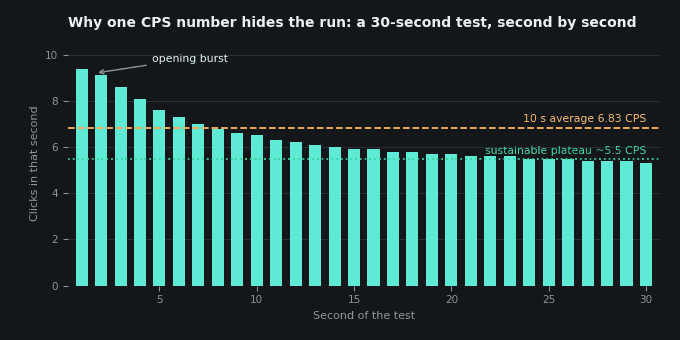
The opening burst is not sustainable clicking. It comes from muscles that are fresh and from the fact that you chose the moment to start. The plateau is closer to what you could actually maintain in a game. The gap between them is often 2–3 CPS.
| Curve shape | What it usually means |
|---|---|
| High start, steady decline, flat tail | Normal. The tail is your sustainable rate. |
| Flat throughout | You are pacing rather than pushing, or the test is too short to fatigue you |
| Low start, rising | You needed a second to find rhythm — common with jitter and butterfly technique |
| Sharp collapse after a few seconds | Forearm tension building up. Typical of jitter clicking, and the point at which it stops being worth it. |
| Jagged, alternating high and low | Inconsistent finger alternation, or a mouse double-registering some presses |
If your bars look jagged in a way you cannot feel in your hand, the mouse may be at fault rather than the technique. A worn switch can register one physical press as two electrical ones, which inflates a second or two and produces exactly that pattern. The mouse click test checks for that directly.
What counts as a good CPS
These ranges are for a 10-second left-click test using ordinary clicking, not a specialised technique.
| CPS | Tier | Context |
|---|---|---|
| Under 4 | Below average | Casual clicking, or a mouse with a heavy actuation force |
| 4–6 | Average | Where most people land without practice |
| 6–8 | Fast | Practised normal clicking, the realistic ceiling for most hands |
| 8–10 | Very fast | Usually requires a specialised technique rather than normal clicking |
| Over 10 | Exceptional | Jitter, butterfly or drag clicking territory — rarely sustainable for long |
Techniques that raise CPS, and what they cost
Higher scores generally come from changing how you click rather than from clicking harder.
| Technique | Typical CPS | Trade-off |
|---|---|---|
| Normal clicking | 4–8 | Full aim control, sustainable indefinitely |
| Jitter clicking | 8–12 | Arm tension destroys aim; short bursts only; genuine strain risk |
| Butterfly clicking | 10–16 | Two fingers on one button; inconsistent, and banned on many servers |
| Drag clicking | 20–100+ | Wears the switch out; needs a specific mouse; banned almost everywhere |
The honest summary is that normal clicking is the only one of these with no downside. Jitter clicking involves deliberately tensing your forearm to produce tremor, and people do injure themselves doing it for long periods. Drag clicking produces spectacular numbers on a test page and is close to useless in an actual game, because you cannot aim while dragging your finger across the button.
What actually raises your ceiling: the switch
Before you change technique, check the hardware. A mechanical switch with a worn contact drops or doubles clicks and caps your CPS long before your hand does; an optical switch has no contact to wear. If your score has stalled for weeks, test whether your current switch is already failing first.
These are affiliate links — if you buy through one we may earn a commission at no extra cost to you. It doesn’t change what’s listed or the order it’s in. Affiliate disclosure.
What this test cannot tell you
A browser can count clicks accurately. There are several things it cannot see, and any CPS test claiming otherwise is guessing.
- Your mouse’s polling rate. The browser receives events after the operating system has already processed them. A 1000 Hz mouse and a 125 Hz mouse both deliver every click you make — polling affects latency, not the count. The polling rate test estimates it from event timing, with the same caveat.
- Whether a click was intentional. If a switch chatters, the browser sees two genuine, indistinguishable click events.
- Whether the clicks came from a human. Scripted clicks carry a flag browsers set on synthetic events, and this test does not count those — but that flag is a courtesy of the browser, not a security guarantee.
- Your performance in a game. Games sample input on their own tick schedule. Minecraft from version 1.9 onward applies an attack cooldown that actively penalises spam clicking, which the Kohi click test page covers in detail.
Choosing a test length
| Duration | Best for | Caveat |
|---|---|---|
| 1 second | Peak burst rate | Extremely noisy — a single click landing either side of the boundary changes the result by a whole point |
| 5 seconds | A quick check | Still flattered by your opening burst |
| 10 seconds | The standard comparison | Long enough to be meaningful, short enough to repeat. Use this one when comparing scores. |
| 30 seconds | Seeing the decay curve clearly | Fatigue becomes the dominant factor |
| 60 seconds | Sustainable rate | Measures endurance more than speed |
If you only run one, run the 10-second test. It is the informal standard, which means it is the length other people’s scores are quoted in.
Troubleshooting a result that looks wrong
| What you see | Likely cause |
|---|---|
| Score much lower than usual | Different input selected, a heavier mouse, or the browser under load. Check the input buttons above. |
| Occasional seconds far above the rest | Switch chatter double-registering presses. Verify with the mouse click test. |
| Clicks not registering at all | An extension is blocking the script, or you are clicking outside the test area |
| Right click far below left click | Normal and expected — usually 10–25% lower |
| Score differs from another site | Different timing method, different start trigger, and some tests count mouse-up rather than mouse-down. Only compare against the same test. |
| Spacebar rate suspiciously smooth | Held keys repeat automatically. This test ignores auto-repeat — see the spacebar test for the detail. |
FAQ
What does CPS mean?
CPS means clicks per second: the number of clicks you register divided by the length of the test. A 10-second test with 68 clicks is 6.8 CPS.
What is a good CPS score?
On a 10-second left-click test, 4–6 CPS is average and 6–8 CPS is fast for normal clicking. Anything above about 8 CPS usually involves a specialised technique such as jitter or butterfly clicking rather than ordinary clicking.
Why is my right click CPS lower than my left click CPS?
Because it uses your middle finger, which has less independent control than your index finger and far less practice at rapid pressing. A gap of 10–25% is normal and does not indicate a problem with your mouse.
Why does my CPS drop during a longer test?
Your opening seconds are a fresh burst you cannot maintain. The flat tail of the per-second graph is closer to your sustainable rate, and the gap between the two is commonly 2–3 CPS.
How can I increase my CPS?
Within normal clicking, the gains come from a lighter grip, resting your hand rather than hovering, a mouse with a lower actuation force, and practice. Larger jumps require techniques such as jitter or butterfly clicking, which trade aim control, comfort and in some cases switch longevity for the higher number.
Is a high CPS useful in games?
Less than it appears. Aim usually matters more than rate, and Minecraft from 1.9 onward applies an attack cooldown that reduces damage when you spam clicks, so faster clicking can actively lower your output.
Does this CPS test work on a phone?
Yes. Taps register the same as left clicks, so the left-click mode works on touchscreens. Tap rates are generally higher than mouse rates because two thumbs can alternate, so do not compare a phone score with a mouse score.
Does an auto clicker count on this test?
No. Browsers mark clicks generated by scripts as untrusted, and this test ignores those. A separate program driving the operating system is indistinguishable from a real click to any web page, which is one of the limits explained on the auto clicker page.
Sources
- MDN Web Docs — Event.isTrusted. The browser flag this test reads to exclude clicks generated by scripts rather than by a person.
- MDN Web Docs — KeyboardEvent.repeat. How the spacebar mode distinguishes a real press from the operating system’s auto-repeat.
About · Contact · Privacy Policy · Affiliate Disclosure
Related tests and guides
- Click Speed Test — the main test, 1 to 60 seconds
- 10 Second Click Test — the standard comparison length
- Click Per Second Test — the same measure explained in full
- Jitter Click Test — the tension-based technique
- Butterfly Clicking — two fingers, one button
- Drag Clicking — the highest numbers, and the costs
- Click Counter — a tally counter with an optional timer, and no test to finish
- CPS World Record — the 760-click Guinness figure, and what isn’t verified
- Kohi Click Test — the Minecraft PvP benchmark
- Spacebar Speed Test — with auto-repeat filtered out
- Mouse Click Test — check your buttons register cleanly
- Reaction Time Test — measure your reflexes in milliseconds
- Scroll Test — scroll wheel encoder health and reversals
- Mouse Tester — full button, side-button and scroll diagnostic
- Keyboard Test — dead keys, chatter and rollover limits
- Auto Key Presser — what keystroke automation can and cannot do